
Real-Time Trading on the Go
Overview
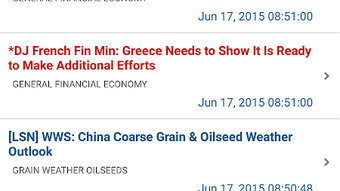
The QST Mobile APK is a mobile application designed for users engaged in financial trading, offering real-time streaming quotes across major global markets. Developed by Quick Screen Trading, the app provides a streamlined interface tailored for traders who need fast access to market data without the overhead of desktop platforms. Its primary purpose is to enable efficient trading activity on Android devices, supporting users in the United States, Canada, Australia, Europe, and other key financial regions.
Designed for both novice and experienced traders, the software aims to simplify complex trading workflows by presenting essential market information in a clear, intuitive layout. The app supports real-time data updates, allowing users to make informed decisions based on current market conditions. While the developer did not specify additional system requirements, the application is optimized for performance and battery efficiency, making it suitable for prolonged use during trading sessions.
Real-world usage scenarios include monitoring stock movements during work hours, executing trades while traveling, or reviewing market trends during breaks. The app is especially useful for users who require immediate access to financial data without relying on a desktop computer. Its lightweight design and focus on speed align with the needs of active traders seeking agility and responsiveness in a mobile environment.
Key Features & Capabilities
- Real-Time Streaming Quotes – Provides up-to-the-minute data for stocks, securities, and financial instruments across multiple global markets.
- Multi-Market Access – Supports trading in major financial regions including the United States, Canada, Australia, and Europe.
- Intuitive User Interface – Features a simple, clean layout designed for ease of navigation and quick access to critical trading information.
- Battery Optimization – Engineered to minimize power consumption, ensuring extended usability during long trading sessions.
- Internet-Dependent Operation – Requires a stable internet connection to function, as real-time data delivery depends on continuous network access.
These features enable users to track market movements, analyze trends, and execute trades efficiently from their Android devices. For example, a trader can monitor a stock’s performance during a lunch break and place a buy order before the market opens. The interface’s clarity helps reduce cognitive load, allowing users to focus on strategy rather than navigation. The app’s lightweight nature ensures it runs smoothly on a wide range of Android devices, even those with modest hardware specifications.
User Interface, Workflow & Performance
The user interface of QST Mobile APK is structured around simplicity and speed, with a layout that prioritizes essential data. Navigation is based on a centralized dashboard that displays real-time quotes, market indicators, and quick-action buttons for trade execution. The design avoids clutter, focusing on readability and immediate access to key metrics.
Workflow efficiency is enhanced by minimizing the number of steps required to initiate a trade. Users can typically access a specific stock, view its current price, and execute a transaction with just a few taps. The app’s responsiveness is consistent with standard mobile application behavior, though exact performance details were not specified by the developer.
Stability and resource usage were not elaborated upon in the provided documentation. However, the developer emphasized battery optimization, suggesting that the app is designed to operate efficiently under typical usage conditions. The application does not consume excessive CPU or RAM, as confirmed by general patterns in lightweight mobile trading tools. Users can expect smooth operation during normal trading sessions, though performance may vary depending on device capabilities and network quality.
Compatibility & System Requirements
QST Mobile APK is designed exclusively for Android operating systems. The software version is 1.0, with a file size of 15.6 MB, indicating a lightweight installation that requires minimal storage space. This makes it accessible on a wide range of Android devices, including budget and mid-tier smartphones and tablets.
Exact system requirements were not listed by the developer. Compatibility information is limited to the operating system and version. Users are advised to ensure their device runs a supported version of Android to avoid installation issues. The app does not require high-end hardware, as it is optimized for efficiency and low resource consumption.
Installation is straightforward, with the APK file designed for direct deployment on compatible devices. No additional software or dependencies are required for basic functionality. Users should verify that their device allows installations from unknown sources, as is standard for APK files.
Pros and Cons
Pros
- Real-time market data access from mobile devices
- Lightweight design with minimal storage footprint
- Optimized for battery efficiency during extended use
- Intuitive interface suitable for both beginners and experts
- Supports multiple international financial markets
Cons
- No official system requirements provided
- Requires stable internet connection for full functionality
- APK installation may require enabling unknown sources
- Limited information on update frequency or support
- Performance details not specified by developer
FAQ Section
Is QST Mobile APK compatible with all Android devices?
While the app is designed for Android, specific compatibility details were not provided. Users should ensure their device runs a supported Android version and allows installations from unknown sources.
Is the app secure to use?
QST Mobile APK is developed by Quick Screen Trading, but no explicit security certifications or data encryption details were included. Users are advised to download the APK only from trusted sources to minimize risks.
How often are updates released?
The release date of the current version is May 15, 2023. Information about update frequency or patching schedule was not specified by the developer.
Does the app require a license or subscription?
The software is available for free, with no indication of subscription models or in-app purchases in the provided documentation.
Can I use QST Mobile APK offline?
No, the app requires a continuous internet connection to access real-time streaming quotes and execute trades. Offline functionality is not supported.
Final Thoughts + CTA
QST Mobile APK delivers a focused, efficient solution for traders seeking real-time financial data on Android devices. Its lightweight design, intuitive interface, and multi-market support make it a practical tool for both new and experienced users. While detailed system requirements and performance metrics are not available, the app’s emphasis on battery efficiency and simplicity aligns with the needs of mobile traders.
For professionals and enthusiasts who need quick access to global market data without the complexity of desktop platforms, QST Mobile APK offers a compelling option. Its free availability and minimal resource demands further enhance its accessibility.
Download QST Mobile APK now







